desktopPill and notch
A compact glass pill that expands into a full chat with markdown, math, code and tool activity. Drag it to the top edge to dock into a notch where the running reply shows live.
Claude Code · Codex · Desktop · Phone · Watch
Ally keeps your coding agents in one small glass window on top of everything you do. Ask about whatever is on screen, get answers drawn out on a board, and keep the same chat going on your phone and watch.
The agents keep their own tools, sessions, folders and permissions. Ally is the surface around them, and it stays out of the way until you call it.
The pill, collapsed
Why does this test fail only on CI?
Codex · read 3 files
The CI image runs TZ=UTC, so the date parsed in formatDue() lands a day early. Pin the timezone in the test, or format with toISOString().
Apply fixExplain more
Account 1 reached its usage limit
Continuing on account 2 · same chat
…picking up where the last turn stopped. The invoice module is split; next I'm moving the tax rules behind TaxPolicy.
Open Settings
Display → Dark theme
Turning on Dark theme
Passwords, payments and Send buttons are left to you.
What you are seeing
A glass pill that floats over every app. One shortcut opens it; drag it to the top edge and it docks as a notch.
Why it matters
Your agents stay one keystroke away without a terminal or browser tab taking over the screen.
What exists today
Desktop app on Windows, running Claude Code and Codex side by side
Android phone and Wear OS watch apps, connected through an authenticated bridge
Several Codex accounts sharing one chat history, switching automatically
What it does
A compact glass pill that expands into a full chat with markdown, math, code and tool activity. Drag it to the top edge to dock into a notch where the running reply shows live.
Select any region of the screen and ask about it. The crop goes straight to the agent, and the answer comes back beside it.
Search every Claude Code and Codex conversation by keyword, keep drafts per chat, queue follow-ups, and route a question from one chat into another.
Many accounts, one chat
Sign in to several ChatGPT accounts. When one reaches its usage limit, the same chat carries on with the next — no handoff, no new thread. A message refused before it ran is sent again once; a message that may already have run is never resent.
Phone and watch
Let an agent drive your phone for a session you approve once, over any network, without ADB. The screen stays awake, a locked phone asks for your fingerprint, and Stop is always one tap away.
Hold to talk, read replies, answer approvals, and keep live agent progress on the always-on screen.
Local or cloud speech in and out. Speak over a reply to interrupt it; text keeps working when voice is offline.
Visual explanations
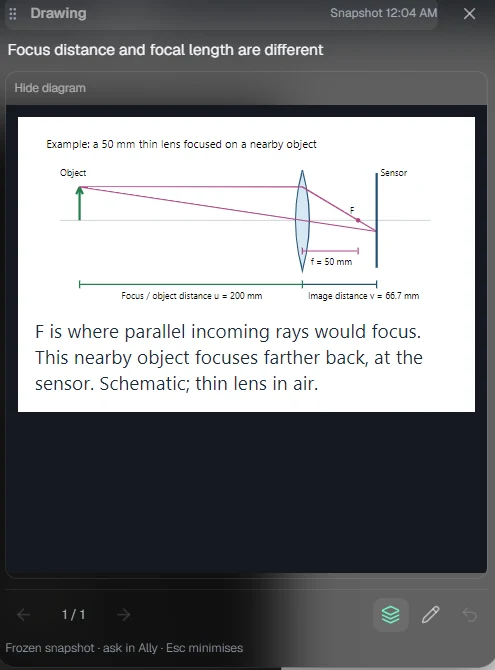
When words aren't enough, the agent draws. Diagrams, steps and interactive sketches open on a sandboxed board beside the chat — resizable, explorable, and saved with the conversation.
How Ally connects
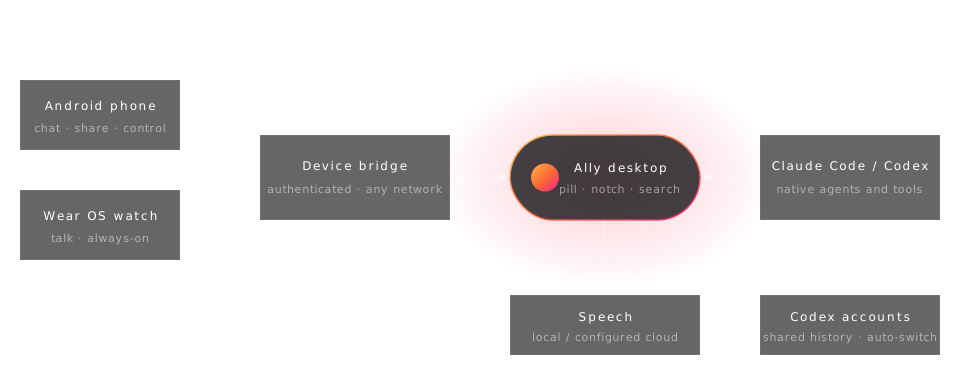
Your PC stays the hub. Phone and watch reach it through an authenticated bridge; Ally talks to the native agents you already use.
You stay in control
Get started
Install a current Node.js LTS and at least one agent — Claude Code or Codex — and sign in to it.
git clone https://github.com/AryanRai/Ally.git
cd Ally/glass-pip-chat
npm ci
npm run dev
Then open Settings → Agents, check the CLI paths, and start a chat. Phone and watch apps are in wear-app.
Next
An Ally-native notch: rebuilding the top-edge surface inside Ally itself, with hover expansion, multi-monitor placement and voice and Circle from the notch.